
1. Architecture
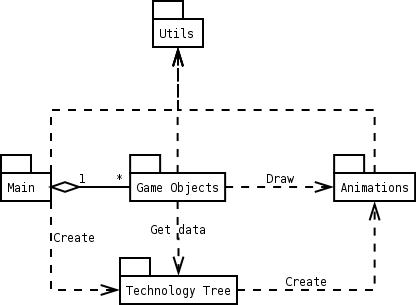
Package diagram
1.1 Animations
All drawing is done using animation classes. The game doesn't contain any dynamic animations, that is, there is no interaction between animations and the environment. For example, particle effects will not be affected by the wind, and no holes are generated to the terrain from explosions. Therefore animation interface remains very simple, and animations are independent from the other components.
1.1.1 Animation classes
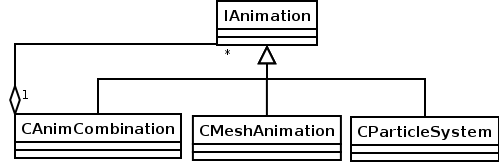
Animation classes
All animation classes derives from IAnimation, which defines the interface for drawing, restoring and releasing animation. It also defines getters for duration and bounding box of the animation. There are two basic animation classes, CMeshAnimation and CParticleSystem. CAnimCombination class can be used to combinate multiple animations. Special animations are used for sky box and height map (see 1.2.1).
CMeshAnimation contains animation loaded from Microsoft .x file. It can be non-animated mesh or skinned mesh. However, only one skinning animation can be played at the time.
CParticleSystem contains animated particle effect. Positions, colors and sizes of the particles are defined in keyframe sequences. Particle system interpolates between keyframes. If more than two position keyframes are specified, Catmull-Rom interpolation is used. Otherwise linear interpolation is used.
CAnimCombination reads animation information from a text file. Number of animations is at the beginning of the file. After that there is name, starting time, ending time and optional transformation matrix for each animation. This class can be used to combine animations (for example, add smoke to pipe) or to play animations in sequences (for example blinking light).
1.1.2 CAnimationStorage
Animation storage is used to load and access animations. This way each animation and texture will be loaded only once. It can be used to restore all animations, in case they are lost (see "Lost Devices" from DirectX SDK documentation).
1.1.3 CParticleSystemLoader
Particle systems are loaded from Lua files (see 4.3) using CParticleSystemLoader. File contains properties of the system, as well as script to initialize keyframes.
1.2 Game objects
All objects in the game are derived from CGameObj. Most of these objects are visible, but there is also invisible objects, like camera and pieces of AI. Practically all game session data is stored in game objects. Game can be saved and loaded by externalizing and internalizing game objects. Every object has an unique id number, and index to the data structure where it is stored. Objects must be accessed using id and index, not with pointers. This way invalid pointers to destroyed game objects can be avoided.
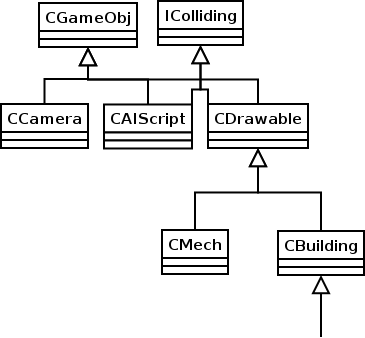
Game objects
1.2.1 Collision detection
IColliding is interface for all objects that can collide with height map (see 1.5.1) or each other. Collision detection has two phases. First distance between objects is compared to the radius of both objects. After that bounding boxes are used for more accurate detection. Every object may have several bounding boxes.
1.2.2 Drawable objects
Basically all visible objects derive from CDrawable. However, it is possible to draw other kinds of objects if necessary. CDrawable is the base class of most of the game objects, and it contains all basic components like position, movement and animation data. Drawable objects are updated and drawed every frame using these values.
1.2.3 CMech
The single most important game object is CMech. It contains all mech data and behaviour. However some parts, like AI (see 1.5.2), are divided to separate classes. As mech animations are more complicated (different weapons, turning upper body, shooting, moving), it requires more animation data than common CDrawable object.
1.2.4 CBuilding
Buildings are noticeable part of the game. All RTS-mode functionality, like buildings, technologies, upgrades and resources are directly connected to the buildings. Buildings which are just part of the technology tree (see 1.4), but have no special purpose, are directly CBuilding instances. Extended classes have to be implemented for more complicated buildings, like command center, dock yard, power distribution system and defence building (turret).
Distribution channels are special pipes for resource distribution. They can only be constructed next to the command center or each other. Unconnected channel block may look like a regular building, but adjacent channel blocks are connected with extra animation. Each channel block stores links to following blocks. This way continuous pipes from command center to resource occurrences can be detected.
1.3 Message system
Messages are used for communication between game objects. This enables general interaction, timing of events, message based state machines (see 1.5.2) and more efficient way to get information from environment. In traditional polling system, objects are observing game state in every frame. In message based system, objects are informed by a message when an event occurs.
Game objects are stored in special data structures. These are similar to linked lists, but are implemented using indices (to fixed size node array) instead of pointers. Using index and id of the receiver object, message can be delivered in constant time while still insuring the validity of the receiver. Index and id of the sender object are also included in the message to enable replying.
Message contains one integer to identify the message, two parameters and a time delay. Receiver of the message can be same as the sender, as it can be used for timing purposes. There is no support for multiple recipients or cancelling queued (sended but not delivered) messages. When game is loaded or saved, whole message queue has to be included.
1.4 Technology tree
Game contains several data classes for loading and storing information about weapons, buildings and technology tree. All technology tree related data is loaded from xml-file. Predefined schema files are used to make technology tree creation and manipulation easier (see 4.6). See concept document 3.3.2 and 3.3.4 for weapon and building data descriptions.
1.5 Artificial intelligence
The game is heavily concentrated on artificial intelligence. It has to deal with all traditional RTS game problems. At the lowest level, path finding and unit behaviour has to be solved. At the highest level there are strategic AI, resource management and so on. Because of the FPS mode and special AI technology branch, there has to be also sufficient tactical AI.
AI components are tightly tied up to game object classes. Most of them can be isolated to separate classes, but they are still under the Game Objects package. External tools are used for scripting and fuzzy logic (see 4).
Even if AI is essential part of the game, it can't be made perfect. Strategic AI is not as important as other parts, because scripted missions are used in single player campaign.
1.5.1 Pathfinding
Pathfinding is common problem in almost every game. In RTS games it has to be dealed very carefully, as there is usually lots of moving units. In this game however, there is only few moving units, which simplifies the problem.
Mechs are able to navigate if path finding -technology has been developed (see Concept document, 3.3.3.4). When mech is ordered to move to another location, path in the static world (including map and non-moving objects) is calculated instantly. This is done using points-of-visibility pathfinding. Graph for the search is pre-generated from the height map and objects. Search algorithm is A*, and euclidean distance is used for heuristic function. If another mech is blocking the way, simple steering (obstacle avoidance) algorithm is used to go around the obstacle. If this fails, or new building has appeared on the way, path is recalculated. If no paths are available, mech has to give up and stop.
1.5.2 Mech AI
Mech AI has two levels. Basic behaviour is accomplished using message based state machines. If state machines are implemented as a separate classes or Lua scripts, they can be switched according to the automatic operation mode of the mech.
Tactical AI is needed for computer players and higher level automatic operation modes. Behaviour for these purposes can be scripted, but it requires some knowledge about map, base and enemies. This knowledge is shared between all mechs, and stored to special class. Knowledge is presented by a fixed set of variables describing base coordinates, important map locations, last spotted enemy mech coordinates and so on. It is possible to have incorrect (changed) information, and all information has to be perceived. No cheating is allowed at this point.
1.5.3 Strategic AI
Purpose of the strategic AI is to enable normal playing against computer players. Building the base and mechs, developing technologies, resource management, expanding, attacking, and defencing are all parts for strategic planning. Knowledge class (see 1.5.2) is used to store information about the enemies. Essential information about the enemy strength can be used without scouting, but the player should not be able to detect this cheating. Simple terrain analysis is used to get strategic information about the map.
Building the base becomes very demanding task, because computer should be able to play with any race (technology tree). At some level, predefined build orders can be used. At the beginning AI should choose some target technology, and develop the required buildings and technologies. Primary attack is scheduled right after the target technology is developed.
Fuzzy system is used to determine the best strategy (see 4.2). Rules are based on the gathered knowledge and the game state. For example, if enemy has an economic advantage and strong defence, expanding might be a good idea.
Scouting and small strokes are performed during the whole game. Multiple mechs are not used before tactical AI technology level. If resources are not available or can't be gathered, full attack strategy is used for the rest of the game.
1.5.4 Scripting
Several AI components are based on scripting language Lua (see 4.2). Lua is also used in scripted single player missions. Scripts for these components can be added from the level editor (see 4.5).
All scripts are able to send messages (see 1.3). Some of them are also activated only when a message has been received. More advanced script components may need an additional interface defined for special purposes.
1.6 Main package
Highest level functionality of the game is centralized in one main class. This class contains data structures for all game objects, messages and so on. Main loop is responsible for updating and drawing the whole game world.
User interface classes are used for main menu of the game, in-game menus and other UI elements. Animation classes are used for drawing UI, including the mouse cursor. Additional animation class is required for displaying text.
1.7 Utility classes
Utility classes for accessing devices are implemented as singleton classes. CDirectInput is used for getting input from keyboard and mouse. It is used by main class of the game. CDirect3D is utility class for graphics. Animation classes use it for drawing animations. It contains matrix stack, which is used by game objects. CDirectSound is used for playing music and sound effects by main class and game objects.